Versus comparison video — Arcade fighter style
Make a versus comparison like an arcade fighting game: two pixel robot boxers, health bars, FIGHT! and K.O.!, stat sheets and a high score table.
包含于 Starter 套餐,提供全部 81 种风格以及您自己的风格 · 预览由 ClipOnIt 引擎渲染
此风格的外观
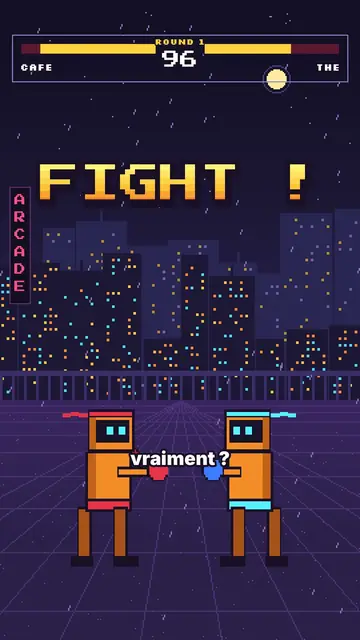
Arcade fighter turns your topic into a retro brawl. In a purple night street, in front of a pixel city under the rain, two orange robot boxers face each other. At the top, the arcade HUD shows their names, their health bars, the round number and the timer. “FIGHT!” bursts out in big yellow-orange pixel type, and when an argument wins, the opponent drops with a white flash and a “K.O.!”.
Between rounds, the game brings out all its screens: a rolling pixel counter, a “CONTINUE?” with its countdown, a grid select screen where the cursor picks a fighter, stat sheets popping on a striped background, a high score table. Scenes open with an iris, text pops, and a crowd of robots can flood the foreground when you need to show “a hundred versions”.
适合的主题
Avoid: serious, sad or sensitive topics: the brawl tone and the K.O.s would make them feel wrong. Also avoid topics with no opposition or ranking; the style needs two sides or a score.
- “X vs Y” comparisonsTwo names in the HUD, one round per criterion and a K.O. for the winner: the format is built in.
- RankingsThe select screen and the high score table rank the options like in a game.
- Tech and AITwo models, two phones, two apps: stat sheets compare the key numbers.
- Gaming videosViewers recognise the arcade codes and stay to see who goes down.
这种风格的视频创意
- Coffee vs tea
Both names in the HUD, a caffeine round, a sleep round and the final stat sheet.
- iPhone vs Android
Three rounds, a K.O. per criterion and the score table at the end.
- The best free editing tool
The grid select screen, the cursor picking and the winner's sheet.
- Why we give up on our resolutions
You vs laziness, the CONTINUE countdown and the number of days held.
1 次点击即可获得
- 打开此风格的链接
点击“以此风格创建视频”按钮,即可打开编辑器,并已选好这种风格。没有账户的话,注册只需一分钟,无需绑定银行卡。
- 用一句话写下你的主题
一个创意就够了。你也可以粘贴文字,或在 Starter 方案中对着麦克风旁白:视频会基于你的声音生成。
- 检查,然后渲染
AI 编写场景,选取风格元素,并根据台词安排时间,同时配上配音和字幕。你可以修改不合适的地方,几分钟后即可获得竖屏 MP4。
您可以调整的内容
For each scene you pick the shot (duel, solo, number, continue, select, sheet, scores or end), the big pixel announcement and its line below, the HUD names and round, which fighter falls and on which word, the crowd, the white flash and the word to comment.
常见问题
是否免费、输出格式和用途:简短解答。
Do accents work in the pixel font?
Big pixel announcements are written without accents, like on an arcade cabinet. Captions keep the full spelling.
我可以使用自己的声音吗?
Yes. Record yourself or import your audio: hits, K.O.s and screens land on your words.
How is it different from Pixel RPG quest?
Pixel RPG quest tells a tutorial as a quest, with a checklist and inventory. Arcade fighter pits two sides against each other, round after round, until the K.O.
这种风格包含在免费方案中吗?
不,它随 Starter($29/月)提供:每月 15 个无水印视频,全部 81 种风格,外加你自己的风格。免费方案每月提供 3 个带水印的视频,以及其他 8 种风格:Pixel News、Press paper、Comedy cartoon、Class sketch、Night tale、Social screen、Retro synthwave 和 Flat vector。