AI coding tutorial video — Twilight desktop style
Make an AI or coding tutorial on a fake computer desktop at sunset: terminal and code windows swinging in 3D, video cards in a fan, a walking avatar.
包含于 Starter 套餐,提供全部 81 种风格以及您自己的风格 · 预览由 ClipOnIt 引擎渲染
此风格的外观
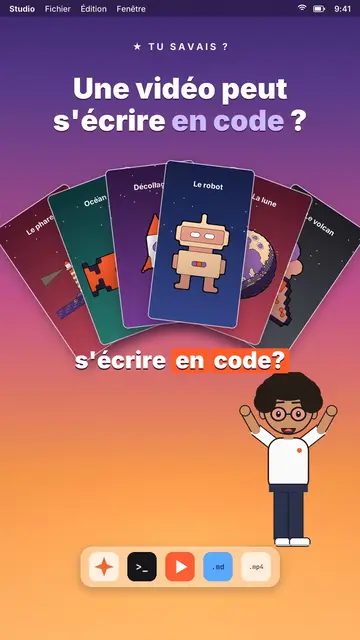
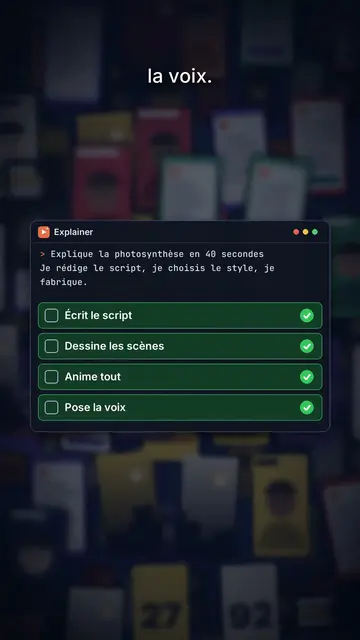
Twilight desktop recreates a computer desktop, with its menu bar at the top and its dock at the bottom, set on a violet, pink and peach sunset gradient. Dark windows swing open in 3D on the spoken word: a terminal typing its commands, a code editor, a recap window, a statistic. Vertical videos spread out in a fan or a grid, and a counter climbs to the announced number.
At the bottom of the screen, a full-body avatar walks from one side to the other and presents, points or raises an arm. The big white title at the top carries one word in lavender, under a small mono kicker (“★ did you know?”). An orange tag pops under a window to say “written by AI”. The end can release an army of avatar clones, then a “Comment” card with a field that types itself and a “Subscribed” card.
适合的主题
Avoid: topics far from the screen, like nature, history or sport: everything happens in a fake operating system. Also avoid emotional stories; the tone stays that of a demo.
- Coding and AI tutorialsThe terminal and the editor show the real command, line by line, as you say it.
- Tech “did you know?” clipsThe kicker and the lavender title ask the question, the swinging window gives the answer.
- Tool showcasesVideo cards in a fan show what the tool produces, without screenshots.
- Growth numbersThe counter climbing in its window makes a result concrete and measurable.
这种风格的视频创意
- A video can be written in code
Video cards in a fan, the editor filling up and the “written by AI” tag.
- Automate a task in 3 commands
The terminal typing each command, the recap and the avatar giving a thumbs up.
- How many hours AI saved me
The stats window, the climbing counter and the grid of finished tasks.
- Make 100 videos from one script
The video grid filling up and the clone army at the end.
1 次点击即可获得
- 打开此风格的链接
点击“以此风格创建视频”按钮,即可打开编辑器,并已选好这种风格。没有账户的话,注册只需一分钟,无需绑定银行卡。
- 用一句话写下你的主题
一个创意就够了。你也可以粘贴文字,或在 Starter 方案中对着麦克风旁白:视频会基于你的声音生成。
- 检查,然后渲染
AI 编写场景,选取风格元素,并根据台词安排时间,同时配上配音和字幕。你可以修改不合适的地方,几分钟后即可获得竖屏 MP4。
您可以调整的内容
For each scene you pick the kicker, the title and its lavender word, the window that opens on the word (terminal, code, recap, stat, video cards or a library element), the orange tag, and the avatar's side and pose. The last scene carries the word to comment.
常见问题
是否免费、输出格式和用途:简短解答。
Is the code shown real?
It is the text you write in the script: commands, code lines, results. The engine types it into the window; nothing is executed.
我可以使用自己的声音吗?
Yes. Record yourself or import your audio: windows open and the terminal types on your words.
How is it different from Clean interface?
Clean interface plays the story in light windows with a clicking cursor. Twilight desktop sets dark windows swinging in 3D over a sunset, with a walking avatar.
这种风格包含在免费方案中吗?
不,它随 Starter($29/月)提供:每月 15 个无水印视频,全部 81 种风格,外加你自己的风格。免费方案每月提供 3 个带水印的视频,以及其他 8 种风格:Pixel News、Press paper、Comedy cartoon、Class sketch、Night tale、Social screen、Retro synthwave 和 Flat vector。
如果您喜欢这种风格

UI motion design explainer video
Clean interface style · The story played out in clean interface cards: windows, buttons, a cursor clicking on the word, key word in serif.

Glassmorphism tech video
Lavender frosted glass style · Frosted glass UI cards rising and coming into focus on a lavender gradient with halos.
Content creator video
Thumbnail wall style · A midnight blue wall of video thumbnails in depth, a zoom through the wall, gold numbers.