Content creator video — Thumbnail wall style
Make a video for content creators: a wall of video thumbnails on midnight blue, a zoom through the wall, gold serif numbers and a growth curve on the word.
包含于 Starter 套餐,提供全部 81 种风格以及您自己的风格 · 预览由 ClipOnIt 引擎渲染
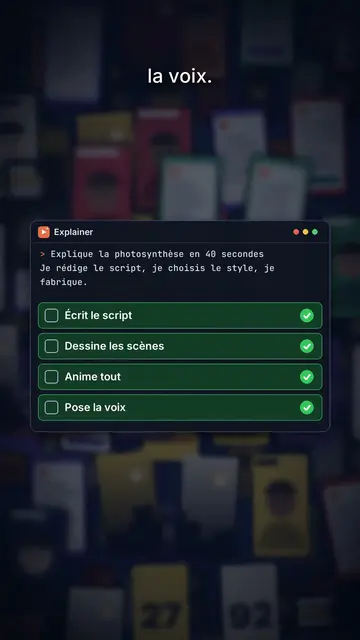
此风格的外观
Thumbnail wall covers a midnight blue background with dozens of video thumbnails set in depth, like a wall of content stretching out of sight. The camera moves forward and passes through the wall: thumbnails in the middle plane stay sharp, those in front and behind blur. The big title at the top centre mixes a bold white sans-serif with words in italic serif, and key words get framed by small orange corners, like in a viewfinder.
Numbers show in giant gold serif and roll to their value, with a mono line underneath. When an object is needed, a card comes in on the word: a 3D product box in chains whose padlock pops open, a code window with a checklist, a growth curve drawing itself, a grid. The wall can darken and blur behind a card, a green “FREE” stamp lands, and the end types “Comment WORD” into a field.
适合的主题
Avoid: topics unrelated to screens or content, like cooking, nature or ancient history: the thumbnail wall would make no sense. Also avoid sad topics; the tone stays one of growth.
- Content creation methodsThe thumbnail wall speaks to creators straight away: it is their daily life.
- Tools and products to unlockThe chained box whose padlock pops shows the access you get.
- Growth figuresThe rolling gold number and the rising curve make a result feel credible.
- Free offersThe green “FREE” stamp and the comment field push viewers to act.
这种风格的视频创意
- Nobody filmed any of these videos
The thumbnail wall, the “Zero filming” title, the gold number and the “FREE” stamp.
- Post every day without burning out
The video grid, the checklist in the code window and the rising curve.
- The format that got me to 10,000 subscribers
The zoom through the wall, the rolling number and the key word in orange corners.
- The tool I use for my thumbnails
The chained box opening, the grid and the “Comment TOOL” field.
1 次点击即可获得
- 打开此风格的链接
点击“以此风格创建视频”按钮,即可打开编辑器,并已选好这种风格。没有账户的话,注册只需一分钟,无需绑定银行卡。
- 用一句话写下你的主题
一个创意就够了。你也可以粘贴文字,或在 Starter 方案中对着麦克风旁白:视频会基于你的声音生成。
- 检查,然后渲染
AI 编写场景,选取风格元素,并根据台词安排时间,同时配上配音和字幕。你可以修改不合适的地方,几分钟后即可获得竖屏 MP4。
您可以调整的内容
For each scene you pick the shot (sharp wall or darkened wall behind the cards), the title and its serif words, a gold number with its line, a card on the word (box, code, curve, grid or element), a stamp, a small note at the bottom and the word to comment at the end.
常见问题
是否免费、输出格式和用途:简短解答。
Are the wall thumbnails real videos?
No, they are thumbnails drawn by the engine, with no real channel or creator. You can import your own images if you want to show your work.
我可以使用自己的声音吗?
Yes. Record yourself or import your audio: the zoom, numbers and cards lock onto your words.
How is it different from Social screen?
Social screen recreates a social feed with a profile, counters and comments. Thumbnail wall shows a wall of videos in depth crossed by the camera, with product cards.
这种风格包含在免费方案中吗?
不,它随 Starter($29/月)提供:每月 15 个无水印视频,全部 81 种风格,外加你自己的风格。免费方案每月提供 3 个带水印的视频,以及其他 8 种风格:Pixel News、Press paper、Comedy cartoon、Class sketch、Night tale、Social screen、Retro synthwave 和 Flat vector。
如果您喜欢这种风格
- 免费
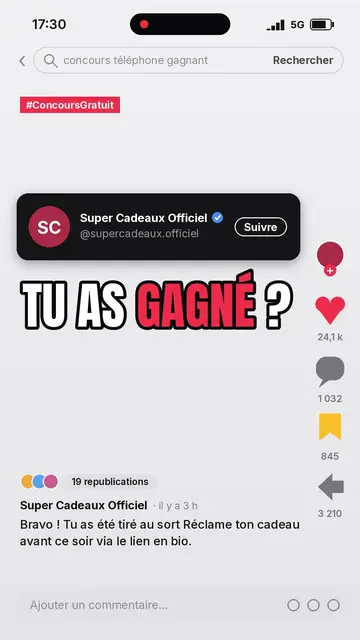
社交媒体解说视频
社交屏幕风格 · 还原的社交信息流:头像、计数器、评论。

AI coding tutorial video
Twilight desktop style · A fake computer desktop on a violet-pink sunset: windows swinging in 3D, a walking avatar.

Cut-out photo dialogue video
Cut-out photo style · Black-and-white people cut out like stickers on a blue-violet gradient, a giant navy title.